Showing posts with label C#. Show all posts

Saturday, June 7, 2014

Convert input string to Title case in C#

Hi All,
   
     This post is about how to convert your input string into TITLE case in C#.

First , let me tell you what is title case : 

When writing a name or a title, it is a common convention to only use capital letters to start the principal words. This is called Title Case. When using Title Case, do not use capital letters for prepositions, articles or conjunctions unless one is the first word.

Examples:
  • Snow White and the Seven Dwarfs.
  • Newcastle upon Tyne / Brighton on Sea .
  • The DiMaggio Line .
  • The Last of the Mohicans .


You can convert your input string either in C# code  or in SQL function (scalar function) :

Convert to Title case in C#

  public static String TitleCaseString(String s)
        {
            if (s == null) return s;

            String[] words = s.Split(' ');
            for (int i = 0; i < words.Length; i++)
            {
                if (words[i].Length == 0) continue;

                Char firstChar = Char.ToUpper(words[i][0]);
                String rest = "";
                if (words[i].Length > 1)
                {
                    rest = words[i].Substring(1).ToLower();
                }
                words[i] = firstChar + rest;
            }
            return String.Join(" ", words);

        }


Convert to Title case in SQL Server function :


CREATE FUNCTION udf_TitleCase (@InputString VARCHAR(4000) ) 
 RETURNS VARCHAR(4000) 
 AS 
 BEGIN 
 DECLARE @Index INT 
 DECLARE @Char CHAR(1) 
 DECLARE @OutputString VARCHAR(255) 
 SET @OutputString = LOWER(@InputString) 
 SET @Index =
 SET @OutputString = 
 STUFF(@OutputString, 1, 1,UPPER(SUBSTRING(@InputString,1,1))) 
 WHILE @Index <= LEN(@InputString) 
 BEGIN 
 SET @Char = SUBSTRING(@InputString, @Index, 1) 
 IF @Char IN (' ', ';', ':', '!', '?', ',', '.', '_', '-', '/', '&','''','(') 
 IF @Index + 1 <= LEN(@InputString) 
 BEGIN 
 IF @Char != '''' 
 OR 
 UPPER(SUBSTRING(@InputString, @Index + 1, 1)) != 'S' 
 SET @OutputString = 
 STUFF(@OutputString, @Index + 1, 1,UPPER(SUBSTRING(@InputString, @Index + 1, 1))) 
 END 
 SET @Index = @Index +
 END 
 RETURN ISNULL(@OutputString,'') 
 END


   Hope this will help!!
  Regards,
  Nitin  Sharma

Tuesday, September 10, 2013

Interview Questions :- .NET,ASP.NET , SQL Server , C#, SharePoint, Javascript, Jquery

Hey All,
   Below are some Questions ( not answers :-) ) that are asked in interviews that I have faced. Hope they prove useful to you for your preparation at some point of time.

 The Questions are mixed of : ASP.NET , SQL Server , .NET Framework , SharePoint , C# , OOPS


  1. What are magic tables in SQL Server 
  2.  How many and what are temp tables in Sql Server ?
  3.  How will you call trigger in Sql Server ?
  4.  How will you call function in Sql Server ?
  5.   There are 2 tables A and B having 3 columns each...What is the output of " Select * from A,B?
  6.   What is the maximum number of Clustered indexes a table can have ?
  7.  when you update a table in SQL Server management studio .., what exactly happens ?
  8.  What is project life cycle?
  9.  What are the differences b/w SQL Server 2008 and SQL Server 2012?
  10.  What is the difference between Site Template and Site Definition?
  11.  What are Generics in C# ? What is the use of it ?
  12.  Protected vs Protected Internal in C# ?
  13.  can we create master page through sharepoint desginer ?
  14.  what is the difference between creating items through sharepoint designer and sharepoint server?
  15.  ASP.NET page life cycle?
  16.  when can we change page's Viewstate ? on which event ?
  17.  can you create site template ? how ?
  18.  what is the prurpose of SPSecurity class in SharePoint ?
  19.  what is Code access security in .NET ?
  20.  There are 2 tables A and B... A has 3 columns , 5 rows ... B has 2 columns , 3 rows ..What will be the output of  a) Select * from A,B b) cross join between 2 tables (how many rows and columns will a cross join between 2 tables return ?)
  21.  What are Cross joins ?
  22. how will update sharepoint list ? write the code.
  23.  what are extension methods in C#?
  24.  what are anonymous methods in c#?
  25.  why multiple inheritance is not possible in C#?
  26. what is a site column in SharePoint?
  27. Difference b/w sandboxed and Farm solution?
  28.  Difference b/w Web Parts and Visual Web Parts.
  29.  how to make a master page in Sharepoint Site?
  30.  abstract class vs interfaces
  31.   Explain Sharepoint Object Model
  32.  What are SPutility and SPMetal in SharePoint ?
  33.  What is .wsdl file in a web service ? 
  34.  how many ways you handle erors in a web page ?
  35.  HttpUtility class vs Http Module
  36.  Can you run JSP pages in IIS ? How ?
  37.  which exception will first occur ?inside BAL , DAL , or UI layers'?
  38.  What does theme in CSS contains ?
  39.  What are views in SQL Server ? can we perform DML in Views?
  40.  User Defined Functions Vs Stored Procedure?
  41.  Difference b/w SQL variable @ and @@
  42.  Difference between Hidden Field vs Viewstate ?
  43.  Boxing and Unboxing difference
  44. What are extension methods and extension classes in C#?
  45.  Inproc vs Outproc in Stored Procedures?
  46.  HTTP module vs HTTP handler
  47.  HTTP get vs HTTP Post?
  48. Abstraction vs Encapsulation
  49.  overloded methods can have different return type?
  50.  static class vs Sealed classes .. why are they used ?
  51.  polymorphism in C#
  52.  types of triggers in SQL SERVER
  53.  Left outer join in SQL SERVER
  54.  What are indexes in SQL SERVER
  55.  What are cursors in SQL Server
  56.  What is the new keyword in Method overriding?
  57.  What are different types of views in SQL Server?
  58.  what is a $ sign in Jquery ?
  59.  How will you enable a website to run only for indian country?
  60.  what are lambda expressions in C#?
  61.  what is difference between array and arraylist ? when to use what and which one is faster?
  62.  what is datareader ? how is it different from dataset?
  63.  What are out, ref parameter in C# method?
  64.  For vs ForEach loop
  65. what is the benefit of putting the .wsp or solution file inside GAC and inside BIN?
  66.  what is RunWithElevatedPrivileges in SharePoint?
  67.  what is the difference between webpart and Visual WebPart?
  68.  what is the difference between Sytem.web.UI.WebControls.Webparts.WebPart vs Microsoft.Sharepoint.WebPart?
  69.  Abstraction Vs Encapsulation
  70.  What is viewstate ? Can you store collections in Viewstate?
  71.  What is the difference between Stored Procedures and User Defined Functions in Sql Server ?
  72.  What is LINQ and advantages of LINQ ?
  73.  I have a collection of strings , Which will be more efficient LINQ or normal for / for each loop?
  74.  What are the ways of storing information into clients computers?
  75.  What are Selectors in Jquery ?
  76.  What are the advantages of Entity Framework?
  77.  Request vs Response Cycle of a Page?
  78. Limitations of sharepoint designer
  79. how will you create master pages and how will you deploy?
  80.  what is a feature ? how will you deploy feature?
  81.  how will you associate one content type to 3 lists ?
  82.  What is caching ? How many types of caching is there?
  83.  What is the difference between caching and session ?
  84.  Generic list vs arraylist vs array in terms of performance and why ?
  85.  why serialization is done and what are the types of serialization?
  86.  What is the difference b/w caching and Session ?
  87. Difference b/w httphandlers and http modules.
  88.  what are the limitations or disadvandtages of Generics
  89.  how to find the 4th highest salary in table?
  90.  .net 2.0 vs .net 4.0 features
  91.  What is garbage collector ?
  92.  garbage collector dispose vs finalize 
  93.  what are table valued functions in SQL Server
  94.  What are shared assemblies
  95.  What is Isnull and collasce operator in SQL Server?
  96.  interface vs abstract class
  97.  return server date in javascript 
  98.  how to increment each salary of all employees with 500 
  99.  how to work with cookies in asp.net 
  100.  javascript function on html control click and asp.net control click

    ALL THE VERY BEST !!!

Tuesday, December 6, 2011

Machine Key Generator for Encrypted PasswordFormat in ASP.NET Membeship

Hello Techies,
   Here i found a MachineKey Generator ( generated in XML  tag ) , which generates your machine key that is used in applications.

Go to this URL : http://www.eggheadcafe.com/articles/GenerateMachineKey/GenerateMachineKey.aspx
Click on the button "Generate Me A Key!"

I found it when i was in need to change my PasswordFormat to "Encryted" in ASP.NET membeship.
So what you have to do is add / change the passwordFormat="Encrypted"/> and add the machine key in the tag. 

So , your web.config will have settings like this.


Asp.NET membership has "Hashed" Passwordformat by default but you have to change in web.config file for "Clear" and "Encrypted" formats. (remember both format names are case sensitive).


Thanks,
Happy coding
Nitin Sharma

Thursday, November 24, 2011

Show excel sheet data in Gridview using C#

Hi All,
   This post show how you can show data of Microsoft Excel Sheet inside a ASP.NET gridview.

The excel sheet in this example is generated by exporting the Northwind Database's Customers table . I have placed the excel sheet  in my D:\ directory and named it as "Test".

The excel sheet looks something like this :


Now on a web page take a ASP.NET GridView Control and and on the Page_load event write this code :


        string F1Name = "D:\\Test.xls";
        string CnStr = ("Provider=Microsoft.Jet.OLEDB.4.0;" + ("Data Source="
        + (F1Name + (";" + "Extended Properties=\"Excel 8.0;\""))));
        DataTable DT = new DataTable();
        OleDbDataAdapter DA = new OleDbDataAdapter("Select * from [Customers$]", CnStr);
       Response.Write("File Accessed!!!!");
        try
        {
            DA.Fill(DT);
            GridView1.DataSource = DT;
            GridView1.DataBind();
        }
        catch (Exception ex)
        {
            Response.Write(ex.Message);
        }
                      

Run the WebPage and see the result as: 


Hope it will be useful.

Thanks,
Nitin Sharma


Wednesday, November 23, 2011

Apply Custom Style to Gridview using Style class and ApplyStyle method

Hi,
  In this post I will apply my own style to the Gridview Control.


1) Add a new page say "GV.aspx" in your asp.net website/web application.


2) Drag and drop  Gridview and a button control from the toolbox on the page.


3) Bind the Gridview on page load event. I have used LINQ to SQL In this example for binding the Gridview.
 The database used is Northwind. The name of LINQ class here is DB and I have added two tables Product and Category.


DBDataContext db = new DBDataContext();
    protected void Page_Load(object sender, EventArgs e)
    {
        // Simple LINQ query
        var products = from p in db.Products
                       where p.Category.CategoryName == "Beverages"
                       select p;


        GridView1.DataSource = products;
        GridView1.DataBind();
    }

Note that I have instantiated DataContext class outside the Page Load event making it Global to the page.

4) Now I will create a new style from the Style class and apply it to the Gridview using ApplyStyle() method.On the button Click Event add this piece of code:

    protected void btnStyle_Click(object sender, EventArgs e)
    {
        Style myStyle = new Style();
        myStyle.ForeColor = System.Drawing.Color.Red;
        myStyle.BackColor = System.Drawing.Color.Turquoise;
        myStyle.Font.Bold = true;
        myStyle.BorderStyle = BorderStyle.Solid;
        GridView1.ApplyStyle(myStyle);
    }

5) Run it and click on the button and see the output.Below is the screenshot showing before and after applying style.

Gridview before applying style


Gridview after applying style (Click on Apply Style Button)


That's it..!

Thanks,
Nitin Sharma


Tuesday, November 15, 2011

Consume / Call a Web Service in Silverlight application

Hi All,
       For all guys looking for how to Call  or Consume a Web Service in Silverlight  then this article is for you .
First of I would like to tell you that I am using Silverlight 4 and Visual Studio 2010.


So First of all create a Silverlight Application and name it anything say  "CBPSilverlight".


Ensure the Check box (Host the Silverlight application in a new Web Site) remains checked Under the "New Web Project Type" dropdown select "ASP.NET Web Site .
Note mine is Silverlight 4 version .Click OK.


Now you will see the Solution explorer as containing 2 Projects now:


Now we add a Web Service that will have web methods to be called inside the Silverlight application.


Right Click on CBPSilverlight WebSite and add new Item as a web Service. Name it as say " SLwebservice"


You will notice a SLwebservice.cs is open now under App_code folder.
This web service is populated with default "Hello World" Web Method.

Add one more Web Method say  GetTodaysDate() which will return todays date and time.
So now your method will look like this ( See both Web Method are higlighted )


Now once your Web Methods are completed , it is now time to consume in the Silverlght application . 
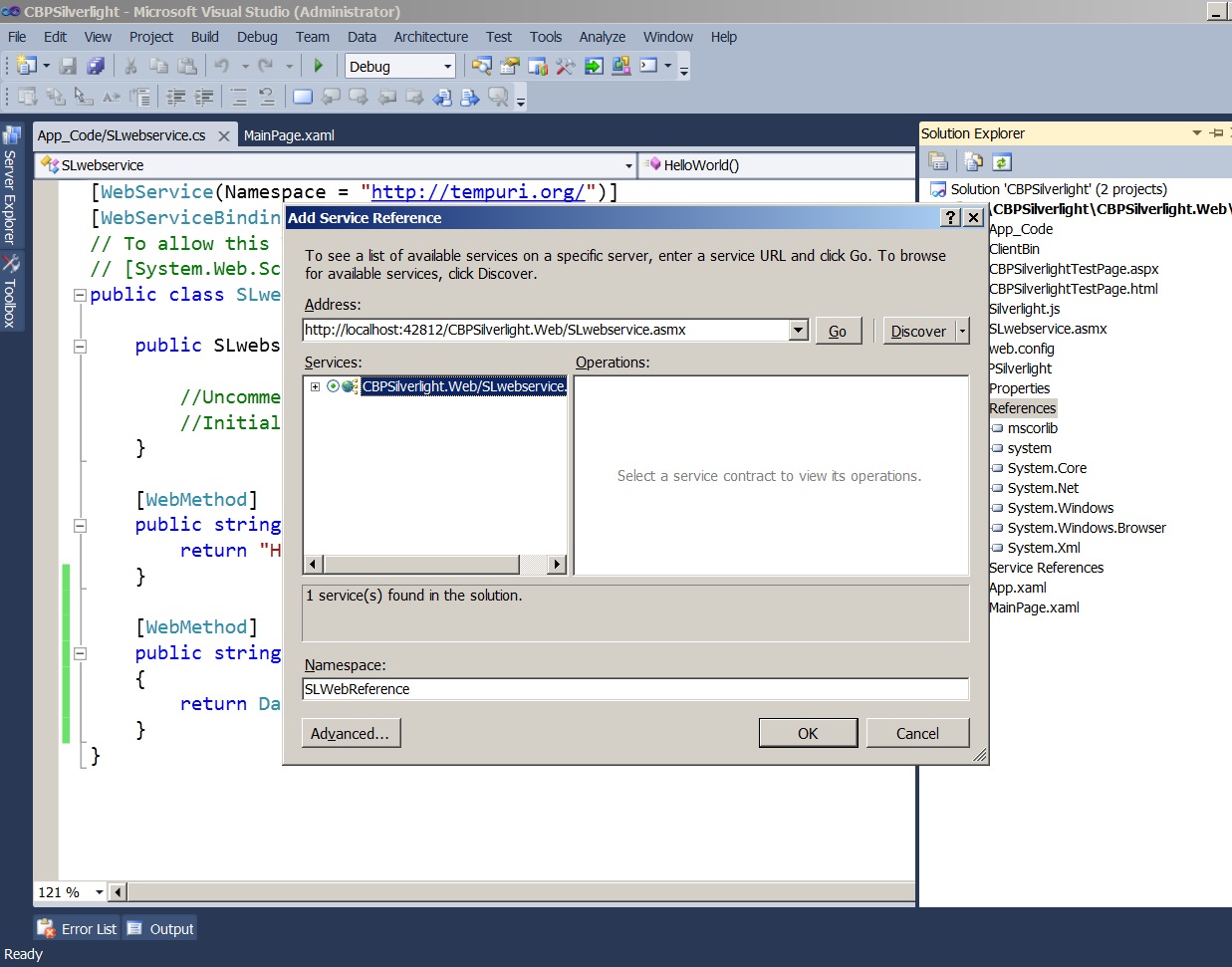
Now right click under the CBPSilverlight application's References' node ( not the Web Site)  and click " Add Service Reference..."


If you are not able to find the Services just click on Discover to find out the SLwebservice.
Give a name to the reference under Namespace column say " SLWebReference" and click OK.


Now in teh CBSilverlight application open MainPage.xaml (designer) and the following StackPanel inside the Grid Tag.


After that go to MainPage.xaml.cs and add a namespace reference for web service . Note web service reference name is qualified by prefixing with Application  name . see below:


Now the final step is to call the Web service (SLwebservice) here.
but remember : 

  1. All Web service calls in Silverlight are asynchronous.
  2. The web service proxy contains two members for each operation in the service: an asynchronous method and a completed event. For example, consider the “HelloWorld” service operation. We first add anEventHandler to HelloWorldCompleted within the scope of the MainPage() constructor. This is the event that will be invoked when the service returns the data we requested. After the event is set up, we are ready to make the call to the service by calling HelloWorldAsync method. 


Now add the following code just under InitializeComponent() in MainPage() constructor.:


            Sclient.HelloWorldCompleted += new EventHandler<HelloWorldCompletedEventArgs>(Sclient_HelloWorldCompleted);
            Sclient.HelloWorldAsync();

            Sclient.GetTodaysDateCompleted += new EventHandler<GetTodaysDateCompletedEventArgs>(Sclient_GetTodaysDateCompleted);
            Sclient.GetTodaysDateAsync();


Now add below two Events that are  mentioned above : 


        void Sclient_HelloWorldCompleted(object sender, HelloWorldCompletedEventArgs e)
        {
            textBlock1.Text = e.Result.ToString();
        }

        void Sclient_GetTodaysDateCompleted(object sender, GetTodaysDateCompletedEventArgs e)
        {
            textBlock2.Text = e.Result.ToString();
        }


So finally your code will look like this : 


Save your Project and Hit F5 or Ctrl+f5 and see the results on the asp.net web site Page.


Below  is the running page : 


Hope you find this post Helpful..
Happy Coding ...
Thanks,
Nitin Sharma