Tuesday, November 15, 2011

Consume / Call a Web Service in Silverlight application

Hi All,
       For all guys looking for how to Call  or Consume a Web Service in Silverlight  then this article is for you .
First of I would like to tell you that I am using Silverlight 4 and Visual Studio 2010.


So First of all create a Silverlight Application and name it anything say  "CBPSilverlight".


Ensure the Check box (Host the Silverlight application in a new Web Site) remains checked Under the "New Web Project Type" dropdown select "ASP.NET Web Site .
Note mine is Silverlight 4 version .Click OK.


Now you will see the Solution explorer as containing 2 Projects now:


Now we add a Web Service that will have web methods to be called inside the Silverlight application.


Right Click on CBPSilverlight WebSite and add new Item as a web Service. Name it as say " SLwebservice"


You will notice a SLwebservice.cs is open now under App_code folder.
This web service is populated with default "Hello World" Web Method.

Add one more Web Method say  GetTodaysDate() which will return todays date and time.
So now your method will look like this ( See both Web Method are higlighted )


Now once your Web Methods are completed , it is now time to consume in the Silverlght application . 
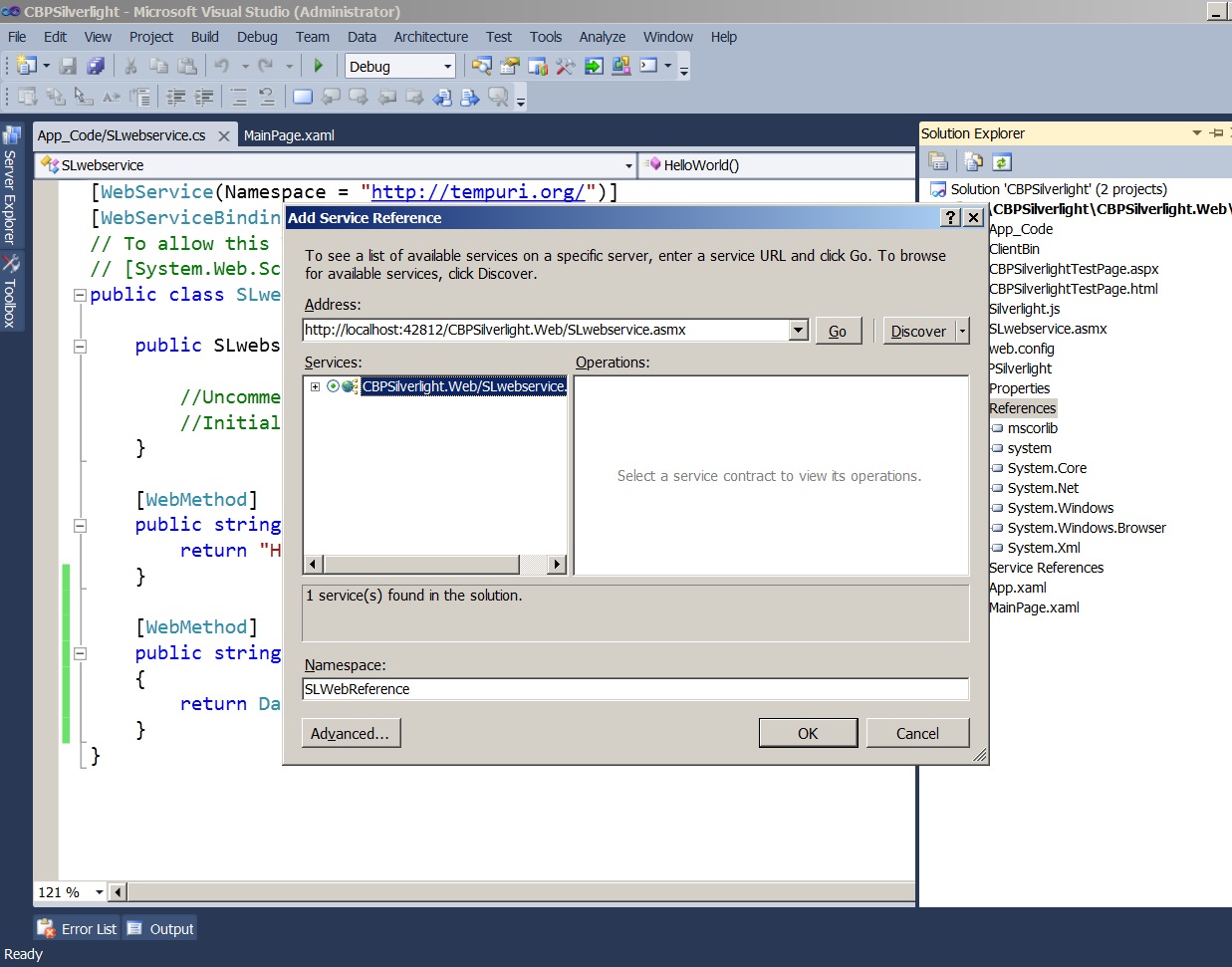
Now right click under the CBPSilverlight application's References' node ( not the Web Site)  and click " Add Service Reference..."


If you are not able to find the Services just click on Discover to find out the SLwebservice.
Give a name to the reference under Namespace column say " SLWebReference" and click OK.


Now in teh CBSilverlight application open MainPage.xaml (designer) and the following StackPanel inside the Grid Tag.


After that go to MainPage.xaml.cs and add a namespace reference for web service . Note web service reference name is qualified by prefixing with Application  name . see below:


Now the final step is to call the Web service (SLwebservice) here.
but remember : 

  1. All Web service calls in Silverlight are asynchronous.
  2. The web service proxy contains two members for each operation in the service: an asynchronous method and a completed event. For example, consider the “HelloWorld” service operation. We first add anEventHandler to HelloWorldCompleted within the scope of the MainPage() constructor. This is the event that will be invoked when the service returns the data we requested. After the event is set up, we are ready to make the call to the service by calling HelloWorldAsync method. 


Now add the following code just under InitializeComponent() in MainPage() constructor.:


            Sclient.HelloWorldCompleted += new EventHandler<HelloWorldCompletedEventArgs>(Sclient_HelloWorldCompleted);
            Sclient.HelloWorldAsync();

            Sclient.GetTodaysDateCompleted += new EventHandler<GetTodaysDateCompletedEventArgs>(Sclient_GetTodaysDateCompleted);
            Sclient.GetTodaysDateAsync();


Now add below two Events that are  mentioned above : 


        void Sclient_HelloWorldCompleted(object sender, HelloWorldCompletedEventArgs e)
        {
            textBlock1.Text = e.Result.ToString();
        }

        void Sclient_GetTodaysDateCompleted(object sender, GetTodaysDateCompletedEventArgs e)
        {
            textBlock2.Text = e.Result.ToString();
        }


So finally your code will look like this : 


Save your Project and Hit F5 or Ctrl+f5 and see the results on the asp.net web site Page.


Below  is the running page : 


Hope you find this post Helpful..
Happy Coding ...
Thanks,
Nitin Sharma


Wednesday, September 28, 2011

Nothing Gonna Stop us Now : Starship

Hi All,
I like this song "Nothing Gonna stop us now" and reminds me of my early teens when I first listened to this song. Here is the video :


Hope you too will like the song ..!
Thanks,
Nitin Sharma

The Immortals of MELUHA : by Amish Tripathi


Hi All,
Today I got a new book delivered from Flipkart : "The Immortals of MELUHA" authored by Amish Tripathi. It is the first part of the the series "Shiva Trilogy" . Thanks to Flipkart for the speedy Delivery ( 1 day ) in Delhi area. I am very much excited to read this book and looking to buy the new book " The secret of the Nagas" already in the market in AUGUST 2011.

Here is the cover page of the book "The Immortals of MELUHA" .


Thanks,
Nitin Sharma

Monday, July 25, 2011

Http Error : 503. The service is unavailable. SharePoint Central Administration and SharePoint WebApplication


Hi All,
Last Friday , I ran Windows Updates on my Machine. and then ran my SharePoint Site and faced an error "Http Error : 503. The service is unavailable."(See the snapshot below).


I run a headache looking into a solution of this problem, tried restarting all services, sql server and even rebooted my machine serveral times. And after which I found that the Application Pool of all sites was stopped. I started the Application Pool for SharePoint Admin and Other SharePoint WebApplication, and things went fine as usual.

Go to IIS, Application Pools and start the Application Pool one by one of each application.(See the below snapshot)


My Machine Specs: Windows Server 2008 R2, Sql Server 2008 R2, SharePoint Server 2010, Visual Studio 2010

Hope this solution will solve your problem.

Thanks,
Nitin Sharma


Friday, July 22, 2011

Differences Between Sandboxed and Farm Solutions

Hello everybody,
This blog post is for all those guys who are new to Microsoft SharePoint Technologies and want a precise concept of what are Sandboxed solution and Farm Solution.

The MSDN explains it brilliantly......


Below is the content from MSDN :

When you compile a SharePoint solution, it deploys to the SharePoint server and a debugger attaches to debug it. The process used to debug the solution depends on the setting of the Sandboxed Solution property: sandboxed solution or farm solution.


Farm solutions, which are hosted in the IIS worker process (W3WP.exe), run code that can affect the whole farm. When you debug a SharePoint project whose Sandboxed Solution property is set to "farm solution," the system's IIS application pool recycles before SharePoint retracts or deploys the feature so as to release any files locked by the IIS worker process. Only the IIS application pool serving the SharePoint project's site URL is recycled.

Sandboxed solutions, which are hosted in the SharePoint user code solution worker process (SPUCWorkerProcess.exe), run code that can only affect the site collection of the solution. Because sandboxed solutions do not run in the IIS worker process, neither the IIS application pool nor the IIS server must restart. Visual Studio attaches the debugger to the SPUCWorkerProcess process that the SPUserCodeV4 service in SharePoint automatically triggers and controls. It is not necessary for the SPUCWorkerProcess process to recycle to load the latest version of the solution.

With either solution type, Visual Studio also attaches the debugger to the browser to enable client-side script debugging. Visual Studio uses the script debugging engine for this purpose. To enable script debugging, you must change the default browser settings when you are prompted.

Visual Studio attaches the debugger only to the W3WP or SPUCWorkerProcess processes running the current site. Visual Studio also attaches the managed COM Plus and workflow debugging engines.


All about Sanboxed Solution , below is the link from http://technet.microsoft.com

http://technet.microsoft.com/en-us/library/ee721992.aspx

I hope the above links will make you clear differences between Sanboxed and Farm Solution in SharePoint.

Have a great day.!

Thanks,
Nitin Sharma